Do you need help identifying your biggest bandwidth abusers and malicious applications running on your network? Then try Axence NetTools.
Axence NetTools is a free and comprehensive set of host monitoring, network scanning, security and administration tools, all with a highly intuitive user interface.
Axence Net Tools monitors the availability of several hosts and their response times. You can set several thresholds so that NetTools will notify you by e-mail, message or sound in case of host not responding or slower connection. NetWatch provides very clear real-time and historical charts of a response time and percentage of packets lost. As with all the other tools, you can export this information as text, Excel and html files.
Lists exhaustive system information from Windows computers: running processes & services, registry, event log, disk, memory & CPU information, and much more. You can also define your own queries.
There are other things which you will find useful in monitoring your network bandwidth using Axence NetTools.
You can download the tool here. And if you are looking for network management services Dubai or IT services, visit Unlimited.
Wednesday, April 21, 2010

Wednesday, April 7, 2010
How to Add Contacts in Microsoft Outlook?
To create a contact in Microsoft Outlook, follow the below steps.

 There is an easy way to open the Address Book window. Right click on the email address that you want to add then choose Add to Outlook Contacts.
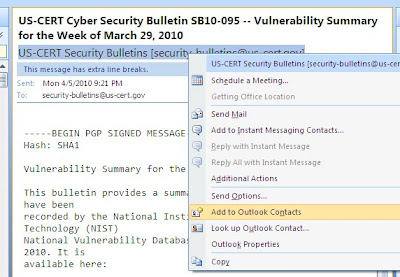
It's so easy, isn't it?
- Open Microsoft Outlook
- Click the Tools menu and then Address Book or press CTRL + Shift + B.

- In the Address Book window, click the New button and then New contact, click File and then New contact, or press CTRL + N.
- In the Properties window, type the name and e-mail of your contact as well as any other contact information you need to remember such as phone number and address.
 There is an easy way to open the Address Book window. Right click on the email address that you want to add then choose Add to Outlook Contacts.
It's so easy, isn't it?
Subscribe to:
Posts (Atom)